How agencies are switching to visual development
- Authors
- Link
- Alex Noel

- Last updated
A few weeks ago, a digital agency reached out requesting an enterprise trial. When we asked about their setup, it sounded familiar—too many client codebases, too much maintenance overhead, not enough time for actual development. It was not the first similar conversation we’d had in recent months.
This reminded us of a case from about 2 years back worth sharing. A digital agency had built numerous e-commerce storefronts for different clients, and a significant chunk of their development capacity went to pixel pushing and content updates instead of new features.
We worked with them to completely restructure their workflow. Here’s what happened.
Evaluating workflow bottlenecks
Every time a client wanted to launch a seasonal hero, swap promotional tiles, or tweak cart logic, it meant developer time. Every merchandising refresh meant weeks of CSS updates. They were spending roughly 24% of their development capacity on changes rather than building new functionality.
This is exactly the kind of problem we built Plasmic to solve. Not by eliminating developers or pretending code isn’t necessary, but by letting developers focus on what they’re good at — implementing complex user interactions, visualizing data, building data integrations and API’s — while giving designers and clients direct control over presentation.
Summarizing the problem
Assume there is an agency with a 12-person team that specializes in building e-commerce platforms for other companies. Their typical project included:
- Product catalogs tied to live inventory and regional pricing
- Bundled offers and promotion engines
- Contact and lead capture forms
- Checkout integrations and post-purchase logic
- On-site personalization and experimentation features
Each client wanted essentially the same features but with their own branding, data sources, and slight variations in layout. The agency found itself in a trap:
Problem 1: Redundant development work
They rebuilt similar components for each client. A hero takeover for Client A. A slightly different product grid for Client B. Promotion banners that were 80% identical but lived in separate codebases. When they fixed a bug in one version, they had to manually port it to the others.
Problem 2: Developer bottlenecks
Every layout change, every merchandising update, every A/B test required developer time. Their designers would create mockups in Figma, but developers still had to implement them over and over again. The lag between design and implementation meant that some design files were often outdated by the time they were implemented.
Problem 3: Client friction
Clients paid lots of money for these experiences. They wanted the ability to launch campaigns, test different layouts, and iterate quickly. But giving non-technical clients direct access to the codebase was obviously not an option. So every small change became a ticket, a context switch, and a delay.
The numbers were brutal:
- Average new storefront: 8 weeks of development time (~320 hours)
- Monthly maintenance per client: 10-12 developer hours
- Context switching cost: ~20 minutes per change request
- Annual developer hours spent on maintenance: ~2,000 hours (about 24% of capacity)
- Estimated cost of that time: ~70/hour)
They needed a better architecture — here’s what happened when this agency rebuilt their workflow with a visual development platform.
Migrating to the visual development platform
Before touching any code, we aligned on how Plasmic would sit inside their stack. Because Plasmic is headless, they could adopt it gradually:
- migrate key components
- launch a handful of pages from Plasmic
- keep the rest inside their Next.js app
- shift traffic only when it makes sense.
They also kept hosting in their own Vercel account instead of moving to Plasmic Hosting, so ops teams still owned deployments. All of their analytics and experimentation tools stayed wired up, and the rollout never felt like an all-or-nothing cliff.
With that plan in place, we worked with them to restructure their entire approach:
Phase 1: Bring key components and design system into Plasmic (Week 1)
Their senior developer spent about a week migrating the React components and design tokens that designers already depended on. Anything that touched logic stayed in code; key components that were purely presentational got exposed to Plasmic.
They started with the code components. Here’s an example source code of what they already had:
// Authentication wrapper with role-based access
function ProtectedPortal({ children, userId, requiredRole }) {
  const { user, isLoading } = useAuth(userId)
  if (isLoading) return <LoadingSpinner />
  if (!user || !hasRole(user, requiredRole)) return <AccessDenied />
  return <ErrorBoundary>{children}</ErrorBoundary>
}

// Dynamic promotion banner with A/B testing
function PromoBanner({ campaignId, variant, placement }) {
  const { content, cta, image } = usePromoContent(campaignId, variant)
  const { trackImpression, trackClick } = useAnalytics()

  return (
    <Banner
      content={content}
      cta={cta}
      image={image}
      onImpression={trackImpression}
      onClick={trackClick}
      placement={placement}
    />
  )
}

// Cart integration with dynamic pricing
function CartSummary({ cartId, promoCode, showRecommendations }) {
  const { items, subtotal, discounts, shipping } = useCart(cartId)
  const total = calculateTotal(subtotal, discounts, shipping, promoCode)

  return (
    <Summary
      items={items}
      total={total}
      recommendations={showRecommendations ? getRecommendations(items) : null}
    />
  )
}
These components handle product authentication, data fetching, real-time inventory, pricing logic, and campaign management. After moving them into a shared package, they registered them with Plasmic so that designers could drop them onto canvases. Here’s an example of how they registered the CartSummary component:
registerComponent(CartSummary, {
  name: 'CartSummary',
  props: {
    cartId: 'string',
    promoCode: 'string',
    showRecommendations: 'boolean',
  },
})
Now, these components appear in Plasmic Studio as drag-and-drop building blocks. Designers configure props through UI controls without touching code.
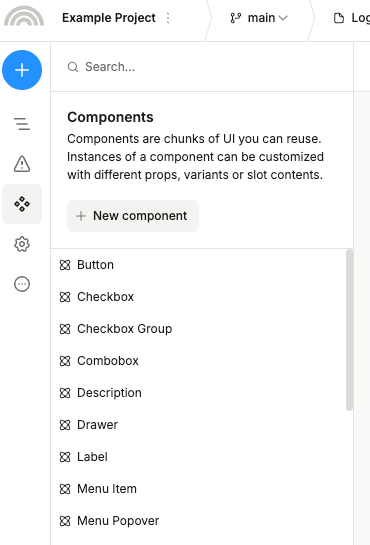
After migrating key components, they mirrored their existing design system in Plasmic so designers could work with the same primitives, just on a different visual surface.
Instead of rebuilding design systems for each client, they built one master system in Plasmic:
- Typography scale (6 heading levels, body text, captions)
- Color tokens (primary, secondary, accent, neutrals, status colors)
- Spacing tokens (grids, paddings, margins, border sizes, etc.)
- Font families and weights
- Icons
- Breakpoints
- Animations
The key is that everything uses design tokens. A button doesn’t have a hardcoded blue color—it uses the primary-color token. This means they can override token values per client without rebuilding components.
- Client A:
primary-color: #0066CC - Client B:
primary-color: #FF6B35 - Client C:
primary-color: #2ECC71
Same button component, different appearance. They published this as a shared Plasmic project that all client projects import.
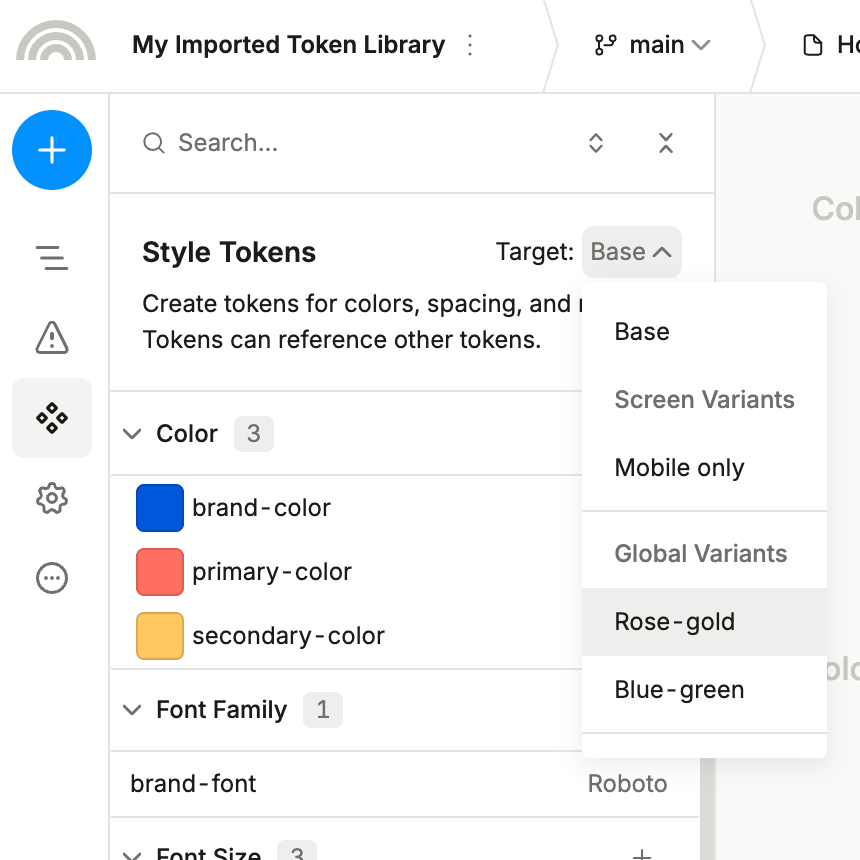
Phase 2: Ship the first landing pages (Week 2)
They picked their newest client—the one requiring the least custom code—for the first migration. Their designer opened Plasmic and followed these steps:
- Imported the shared design system
- Overrode token values for the client’s brand colors
- Composed pages by dragging in registered components
- Connected components to the client’s specific data sources
- Styled layouts and responsive breakpoints visually
Timeline breakdown:
- Day 1: Importing the design system and overriding tokens
- Day 2-3: Building landing pages UI/UX
- Day 4: Connecting everything to the client’s staging API
- Day 5: Responsive design, testing, and publishing to production
5 days total. The developer spent about 4 hours connecting the data sources and reviewing the final build.
Compare this to their previous process: 8 weeks with heavy developer involvement throughout.
Phase 3: Enabling client self-service (Week 3)
This is where it got really interesting. The agency enabled content creator mode for their clients’ marketing teams.
Here’s what they set up:
- Section components: Pre-built, approved sections like Hero, Feature Grid, Testimonials, FAQ, CTA blocks
- Page templates: Starting points for common page types
- Content creator role: Restricted editing mode with guardrails
Clients could now:
- Edit text and images within sections
- Reorder, duplicate, or remove sections
- Build new landing pages by composing sections
- Update their blog content
- Run A/B tests on different layouts
- Change brand colors or typography
- Modify the navigation structure
But they couldn’t:
- Break responsive layouts
- Access custom code components
- Change global spacing/padding values outside of defined ranges
Result: Shortly after enabling self-service, the agency tracked 47 change requests from clients over the following month. Only 8 required developer involvement. The other 39 were handled by clients themselves or by the agency’s designer directly in Plasmic.
Content creator mode documentation
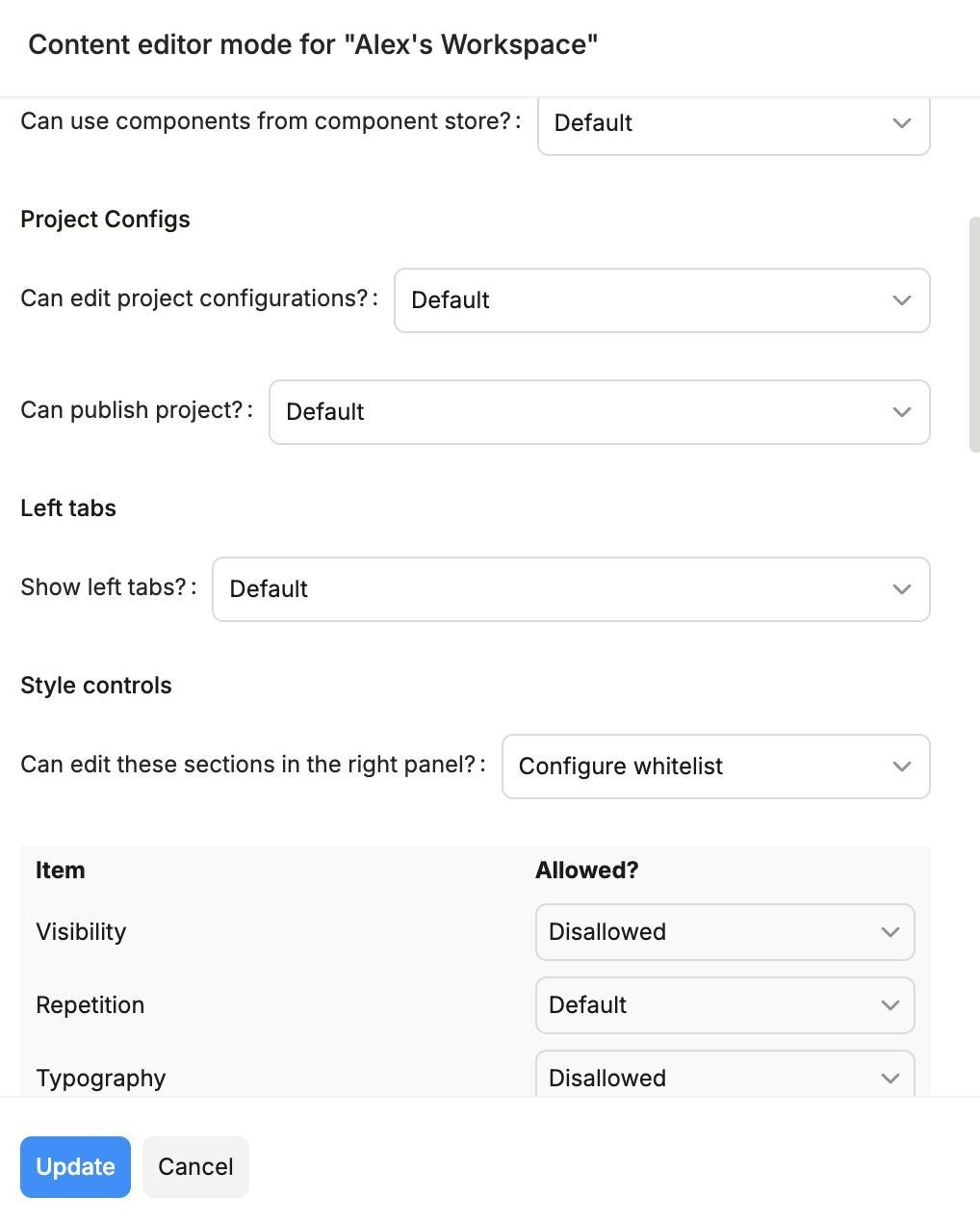
Phase 4: Gradually migrate the rest (Week 4-5)
Over the next two weeks, they migrated the remaining pages and components to Plasmic.
Why so much faster? The component library was already built, the design system was proven, the designer was fluent in Plasmic, and they created templates for common page types.
Here’s how imported components look when shared across projects:
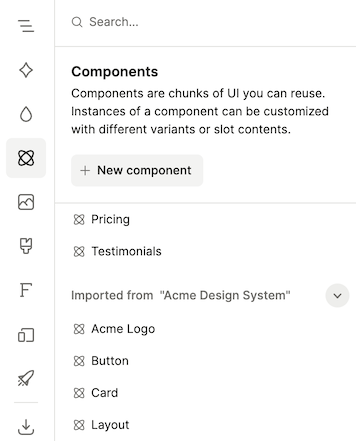
By the end of week five, the whole site was running on Plasmic. New storefront builds now take about 4 weeks instead of 8.
The real-world impact: 1 year later
We checked in with the agency a year after they started using Plasmic. They typically ship about six major storefront launches per year, so the numbers below use that pace as the baseline:
Time savings
Total developer capacity - ~8,100 hours/year (4 FTE developers)
| Metric | Before Plasmic | After Plasmic | Improvement |
|---|---|---|---|
| New storefront build | 8 weeks (320 hours) | About 4 weeks (160 hours) | 50% reduction |
| Maintenance per client | 10-12 hours/month (avg: 11 hours) | 3-4 hours/month (avg: 3.5 hours) | 68% reduction |
| Context switches per change | 20 minutes average | 5 minutes for most changes | 75% reduction |
| Annual maintenance hours (15 clients) | ~2,000 hours | ~630 hours | 69% reduction |
| Capacity spent on changes/maintenance | 24% | 7.8% | 16.2 points reclaimed |
| Capacity available for new features | 76% (~6,100 hours) | 92.2% (~7,470 hours) | +1,370 hours |
Impact on Development Capacity:
- Maintenance capacity reclaimed: 16.2 percentage points (from 24% to 7.8%), freeing ~1,370 hours/year.
- Faster storefront builds now save ~160 hours per launch; at roughly six launches per year, that’s another ~960 hours that can go to net-new work instead of repetitive rebuilds.
- Net effect: about 2,330 hours a year (nearly 0.3 developer-years) get redirected to experiments and new revenue projects, while overall feature capacity rises from ~6,100 to ~7,470 hours.
Total developer hours repurposed in year one: ~2,330 hours
Cost impact
At their blended developer rate of $70/hour:
- Developer time freed up: ~2,330 hours/year (≈$163,000 in reclaimed capacity)
- Additional revenue capacity (conservative 50% billable): ~$81,500/year
- Plasmic subscription (Enterprise plan, 12 seats): $12,000/year
- Migration time cost (one-time, ~5 weeks): ~$14,000
Year one net benefit: ~232,500/year (no migration cost)
Additional billable capacity (if fully utilized): up to ~$163,000/year
Team dynamics
The changes went beyond just time savings:
Developers: Now spend way more of their time on feature development and complex integrations instead of layout tweaks. Morale improved significantly—they’re solving interesting problems instead of adjusting padding.
Designers: Full creative control without waiting for developer availability. They ship design iterations in hours instead of weeks. One designer now handles what previously required constant developer pairing.
Project managers: Change requests no longer pile up in a backlog. Most client requests are handled the same day. Client satisfaction scores increased measurably.
Clients: Direct control over content and layout within safe boundaries. They can run experiments, test variations, and update content without waiting on the agency. Several clients expanded their contracts because of this capability.
Technical workflow
Their current setup:
- Code: Component library in GitHub, deployed as an npm package
- Plasmic: Design system and page layouts, connected via app hosting
- Integration: Plasmic loader pulls designs at build time or runtime
- Deployment: Webhook triggers Vercel deployment on Plasmic publish
- Branching: Designers work in Plasmic branches, merge to main when ready
- Versioning: Can roll back to any published version instantly
The developer workflow is clean:
// app/category/[slug]/page.tsx
import { PlasmicComponent } from '@plasmicapp/loader-nextjs'
import { getProducts } from '@/lib/inventory'

export default async function CategoryPage({ params }) {
  const { slug } = params
  const products = await getProducts(slug)

  return (
    <PlasmicComponent
      component="CategoryPage"
      componentProps={{
        category: slug,
        initialProducts: products,
        // Plasmic handles the layout, we handle the data
      }}
    />
  )
}
Clean separation: designers control presentation in Plasmic, developers control logic in code.
Collaboration features that actually mattered
The agency particularly valued these workflow features:
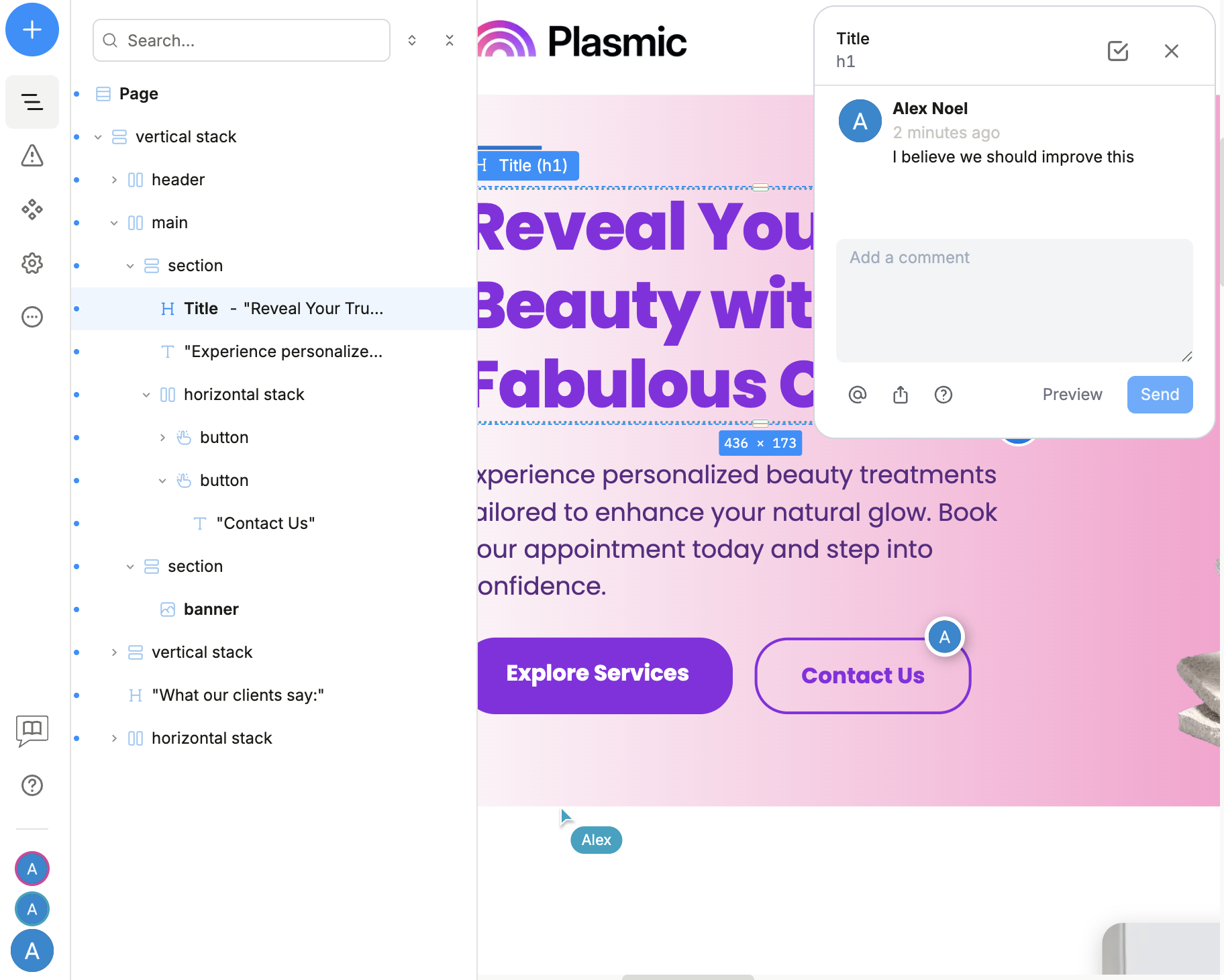
Multiplayer editing: Multiple team members can work on the same project simultaneously. They see each other’s cursors and changes in real-time. Their designer and project manager often review client sites together, discussing changes while both looking at the live project.
Branching: Critical for parallel workstreams. One designer redesigns the homepage in a branch while another builds new features. When ready, they merge and Plasmic automatically handles conflicts. This mirrors Git workflows developers already understand.
Commenting: Leave comments directly on elements. Clients review sites in Plasmic and leave feedback inline. No more “in the upper-right corner…” confusion—comments point to specific elements.
Version history: Every publish creates a snapshot. The agency can revert to any previous version instantly. This saved them twice when clients changed their minds after a redesign.
Collaboration documentation
Branching documentation
What Plasmic didn’t solve
We want to be honest about limitations. Plasmic isn’t magic, and it won’t solve every problem:
Complex application logic still needs code. Multi-step workflows, real-time features, complex state machines, custom business rules—developers still write all of this. Plasmic handles the presentation layer, not the application layer. And that’s a good thing: complex logic belongs in code where it can be properly tested, version controlled, and maintained with standard development practices.
Learning curve exists. The agency spent about 5 weeks on the initial migration. Their designer needed to understand component composition, props, and data binding. Their developer needed to learn how to structure components for visual composition. This is easier than learning to code but not zero-effort.
Some designs are hard to build visually. Highly custom, pixel-perfect designs with complex animations sometimes take longer in Plasmic than in code. The agency keeps a hybrid approach: use Plasmic for 95% of pages, hand-code the 5% that are truly unique.
Should your agency consider this approach?
Based on our experience working with dozens of agencies, here’s when this approach makes sense:
Strong fit:
- You build similar projects for multiple clients
- Layout changes and content updates consume significant developer time
- You have a designer who wants more control
- Clients want self-service content editing
- Your team understands component-based architecture
Weak fit:
- Every project is completely unique
- You don’t have frequent layout changes
- Your team prefers coding everything
- Projects are very simple (few pages, rarely updated)
- You’re building highly interactive applications rather than content sites
Testing this approach:
We recommend starting with one non-critical project. Build it alongside your normal workflow as a safety net. This exposes the real friction points before you commit.
The agency we worked with started with their newest client—smallest risk, easiest to migrate. The full migration took about five weeks. After that success, they started building new storefronts in Plasmic from day one.
Getting started
If this resonates with your agency’s challenges, here’s how to start:
Week 1-2: Learn the tool
- Try Plasmic on a demo project
- Build a few pages to understand the component model
- Register a simple code component to see the integration
- Quickstart guide
Week 3-4: Real project
- Pick a simple client project (marketing or simple e-commerce website)
- Build it in Plasmic while keeping your normal workflow as backup
- See where it speeds you up and where it slows you down
Month 2-3: Evaluate honestly
- Did it actually save developer time?
- Can your designer work more independently?
- Does it fit your workflow or fight against it?
- Is the tool cost justified by the time savings?
If it works, expand gradually. If it doesn’t, you learned something without betting the company on it.
The agency we worked with is now building almost everything in Plasmic. But they started with one project, validated the approach, then scaled from there. That’s the path we recommend.
Next steps
If you’re interested in trying Plasmic for your agency, you can start a free trial here.
You can also join our community to get help and share your experiences.
Follow @plasmicapp on Twitter for the latest updates.